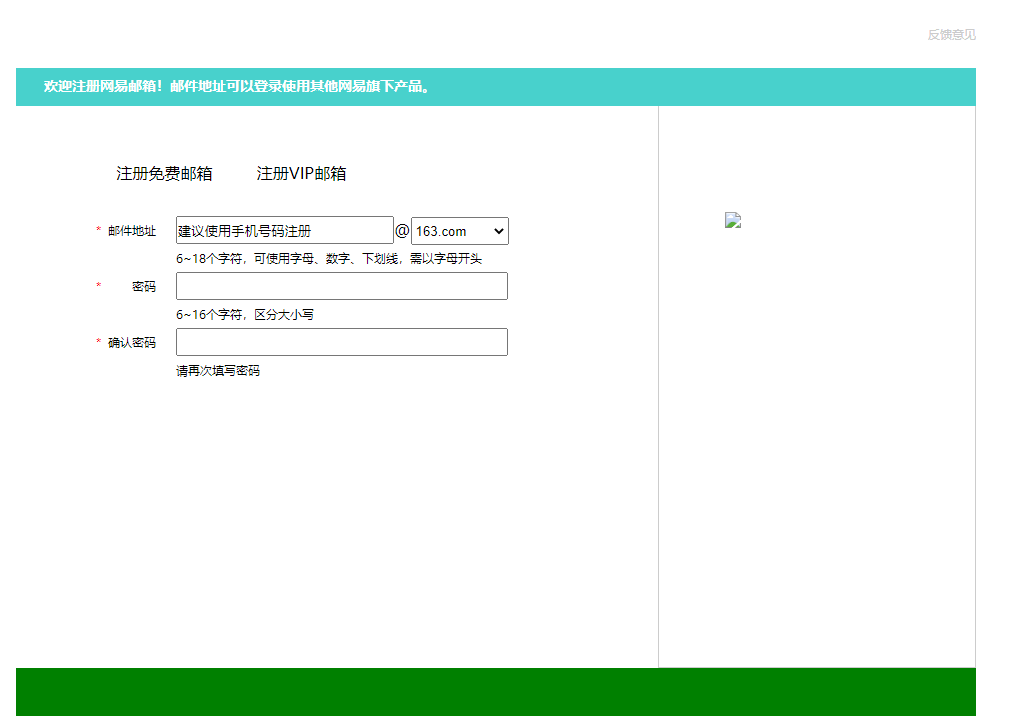
本次将为大家呈现手写网易注册界面效果如何实现的,代码呈现
仿写代码:(仅供参考)
<!DOCTYPE html>
<html lang="en">
<head>
    <meta charset="UTF-8">
    <title>Title</title>
    <style>
 body,div,dl,dt,dd,ul,ol,li,h1,h2,h3,h4,h5,h6,pre,code,form,fieldset,legend,input,textarea,p,blockquote,th,td{margin:0;padding:0}
        .header{
            width: 960px;
 height: 80px;
 margin: 0 auto;
 padding-top: 28px;
 box-sizing: border-box;
 /*box-sizing: border-box;保证在设置内边距时,不会让上面盒子发生变形*/
 }
        .header .logo{
            width: 644px;
 height: 27px;
 background: url("网易注册界面精灵图.png") no-repeat 0 0;
 /*no-repeat是让图片不平铺,0 0 是从左上角x为0y为0开始显示*/
 float: left;
 }
        .header .logo a{
            /*a是行内元素,先用display: inline-block;转换为行内块级元素*/
 display: inline-block;
 width: 130px;
 height: 30px;
 }
        .header .links{
            width: 200px;
 height: 27px;
 float: right;
 text-align: right;
 }
        .header .links a{
            text-decoration: none;
 /*text-decoration: none;让文本默认,这里用来去掉下划线*/
 font-size: 12px;
 color: #ccc;
 line-height: 37px;


 }
        .content{
            height: 600px;
 width: 960px;
 /*background-color: blue;*/
 margin: 0 auto;
 }
        .content .top{
            width: 960px;
 height: 38px;
 background-color: mediumturquoise;
 }
        .content .right h1{
            color: white;
 font-size: 14px;
 line-height: 36px;
 /*网易的H1标签前面是有空隙的,可以用内边距做,
            也可以用text-indent: 2em;让他空2个字符,或者像素*/
 text-indent: 2em;
 }
        .content .bottom{
            width: 960px;
 height: 562px;
 /*background-color: blue;*/
 }
        .content .bottom .article{
            width: 642px;
 height: 562px;
 /*background-color: red;*/
 float: left;
 padding-top: 50px;
 padding-left: 80px;
 box-sizing: border-box;
 }
        .content .bottom .article .articleTop{
            width: 560px;
 height: 60px;
 /*background-color: red;*/
 }
        .content .bottom .article .articleTop ul{
            width: 412px;
 height: 34px;
 list-style: none;
 }
        .content .bottom .article .articleTop ul li{
            float: left;
 width: 137px;
 height: 34px;
 line-height: 34px;
 text-align: center;
 }
        .content .bottom .article .articleBottom{
            width: 560px;
 height: 373px;
 /*background-color: green;*/
 }
        .content .bottom .article .articleBottom .line{
            width: 413px;
 height: 28px;
 /*background-color: yellow;*/
 }
        .content .bottom .article .articleBottom .line input{
            width: 214px;
 height: 24px;
 /*height: 24px;原来是28px因为文本框自带边框,所以减去4px*/

 }
        .content .bottom .article .articleBottom .line .special{
            width: 328px;
 }
        .content .bottom .article .articleBottom .line select{
            width: 98px;
 height: 28px;
 }
        .content .bottom .article .articleBottom p{
            font-size: 12px;
 margin-left: 80px;
 line-height: 28px;
 }
        .content .bottom .article .articleBottom .line .star{
            color: red;
 width: 0px;
 }
        .content .bottom .article .articleBottom .line span{
            float: left;
 height: 28px;
 width: 60px;
 /*background-color: pink;*/
 font-size: 12px;
 line-height: 28px;
 text-align: right;
 }
        .content .bottom .article .articleBottom .line div{
            float: right;
 height: 28px;
 width: 333px;
 /*background-color: yellowgreen;*/
 }
        .content .bottom .aside{
            width: 318px;
 height: 562px;
 /*background-color: tomato;*/
 float: right;
 padding-top: 105px;
 padding-left: 66px;
 box-sizing: border-box;
 border: 1px solid #cccccc;
 /*border: 1px solid #cccccc;设置四条边框*/
 border-top: none;
 /*border-top: none;顶部取消边框*/
 }
        .footer{
            width: 960px;
 height: 48px;
 margin: 0 auto;
 background-color: green;
 }
    </style>
</head>
<body>
<div class="header">
    <div class="logo">
 <!--由于网易中盒子已经放了背景图片,所以我们不用再单独设置img添加属性
        我们可以直接放a标签然后设置其高度宽度和鼠标放上面显示文字-->
 <a href="#" title="网易163免费邮"> </a>
 <!--title鼠标放上去有文字显示-->
 <a href="#" title="网易126免费邮"> </a>
        <a href="#" title="网易Yeah.net免费邮"> </a>
    </div>
    <div class="links">
        <a href="#">反馈意见</a>
    </div>
</div>
<div class="content">
    <div class="top">
        <div class="left">
            <div class="right"><h1>欢迎注册网易邮箱!邮件地址可以登录使用其他网易旗下产品。</h1></div>
        </div>
    </div>
    <div class="bottom">
        <div class="article">
            <div class="articleTop">
                <ul>
                    <li>注册免费邮箱</li>
                    <li>注册VIP邮箱</li>

                </ul>
            </div>
            <div class="articleBottom">
                <div class="line">
                    <span><span class="star">*</span>邮件地址</span>
                    <div>
                        <input type="text" value="建议使用手机号码注册">@<select><option value="163.com">163.com</option><option value="126.com">126.com</option><option value="yeah.net">yeah.net</option></select>
                    </div>
                </div>
                <p>6~18个字符,可使用字母、数字、下划线,需以字母开头</p>


                <div class="line">
                    <span><span class="star">*</span>密码</span>
                    <div>
                        <input type="password" class="special">
                    </div>
                </div>
                <p>6~16个字符,区分大小写</p>

                <div class="line">
                    <span><span class="star">*</span>确认密码</span>
                    <div>
                        <input type="password" class="special">
                    </div>
                </div>
                <p>请再次填写密码</p>

            </div>
        </div>
        <div class="aside">
            <img src="网易注册右侧二维码.png">
        </div>
    </div>
</div>
<div class="footer"></div>
</body>
</html>
仿写效果图: