使用原生 JavaScript 代码实现的 Ajax 请求,不仅繁琐,而且代码的重复度很高。如果你也这么认为,可以了解下 jQuery 中的 Ajax,它封装度高,并且提供了多种接口,方便开发者用最少的代码发送 Ajax 请求。
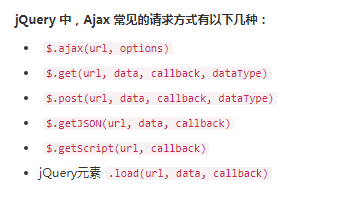
// 使用jQuery发起ajax请求$.ajax("/statics/demosource/demo_get_json.php", {
    //请求类型
    type: "GET",
    //要发送的数据
    data: {
        country: country,
        city: city
    },
    //数据格式
    dataType: "json",
    //请求成功后执行
    success: function (res) {    // res为响应成功返回的数据
        oIpt_country.innerText = res.params.country;
        oIpt_city.innerText = res.params.city;
    },
    //请求失败后执行
    error: function (res) {    // 这里的res为响应失败返回的数据
        alert("请求失败:" + res.status);
    }
});
以下将为大家展示查询城市代码实例:
<!DOCTYPE html>
<html>
<head>
    <meta charset="UTF-8">
    <title>宗波尘客-jQuery调用Ajax查询城市代码示例</title>
    <script src="https://cdn.staticfile.org/jquery/3.4.1/jquery.min.js"></script>
</head>
<body>
    <div id="form">
        <label for="country">国家:<input type="text" name="country" id="country"></label>
        <label for="city">城市:<input type="text" name="city" id="city"></label>
    </div>
    <hr>
    <div>你查询的国家是:<span id="ipt_country"></span></div>
    <div>你查询的城市是:<span id="ipt_city"></span></div>
    <br>
    <button type="button" id="search">查询</button>
    (查询成功后会把你输入的值显示在上方)

    <script>
        var oSearch = document.getElementById("search"),
            oIpt_country = document.getElementById("ipt_country"),
            oIpt_city = document.getElementById("ipt_city");

        oSearch.onclick = function () {
            var country = document.getElementById("country").value,
                city = document.getElementById("city").value;

            $.ajax("/statics/demosource/demo_get_json.php", {
                type: "GET",
                data: {
                    country: country,
                    city: city
                },
                dataType: "json",
                success: function (res) {
                    oIpt_country.innerText = res.params.country;
                    oIpt_city.innerText = res.params.city;
                },
                error: function (res) {
                    alert("请求失败:" + res.status);
                }
            });
        }
    </script>
</body>
提示:此演示代码后端接收地址用的编程狮w3cschool,大家做自己的项目时,客更改为自己的后端url地址